
A GB to MB conversion calculator turns a gigabyte value into megabytes using one of two accepted formulas, decimal or binary. The tool multiplies the entered GB value by 1,000 for the decimal result or by 1,024 for the binary result. Common conversions such as 1 GB, 10 GB, and 100 GB appear instantly in a reference table. A gigabyte is always larger than a megabyte by a factor of 1,000 or 1,024 depending on the standard. The same calculator also converts MB values back into GB using the reverse formula.
What Is the Formula to Convert GB to MB?

There are 2 accepted formulas for converting GB to MB, one used commercially and one used by computer operating systems. The decimal formula states MB = GB × 1,000, and the binary formula states MB = GB × 1,024. Both formulas apply to the same unit name, gigabyte, but they produce different megabyte totals because computing systems and commercial packaging measure storage differently. A phone box, a storage device advertisement, or a data plan brochure almost always uses the decimal formula, while an operating system, a file manager, or a RAM specification almost always uses the binary formula. Understanding which formula applies to a given context is the single most important step before converting any number, since applying the wrong one can shift the result by more than 2% at small values and by more than 5% once the value reaches the hundreds of gigabytes.
What Is the Decimal (Base-10) GB to MB Conversion Factor?
Under the decimal standard, 1 gigabyte equals 1,000 megabytes, because each unit is defined as a power of 1,000 bytes, following the same base-10 pattern used across the entire metric system for prefixes such as kilo, mega, and giga. This standard appears on product packaging and marketing materials for drives, phones, and storage devices, and it also appears on telecom invoices and data plan summaries. According to the International Organization for Standardization, the Institute of Electrical and Electronics Engineers, the European Union, and the National Institute of Standards and Technology, the decimal standard is the formally adopted definition of the gigabyte, even though it is not the most common standard in everyday computing use. For example, 5 GB multiplied by 1,000 equals 5,000 MB under the decimal formula, and 12 GB multiplied by 1,000 equals 12,000 MB under the same formula.
What Is the Binary (Base-2) GB to MB Conversion Factor?
Under the binary standard, 1 gigabyte equals 1,024 megabytes, because computing systems build storage units from powers of 2 rather than powers of 10, since memory addressing and file allocation tables operate on binary logic at the hardware level. Most operating systems, including Windows and macOS, use this standard to report file and drive sizes, and most RAM specifications also follow this standard regardless of how the module is marketed. For example, 5 GB multiplied by 1,024 equals 5,120 MB under the binary formula, and 12 GB multiplied by 1,024 equals 12,288 MB under the same formula.
How Do You Convert GB to MB Step by Step?
To convert GB to MB, follow these 3 steps:
1.Identify the GB value that needs conversion.
2.Multiply the value by 1,000 for a decimal result, or by 1,024 for a binary result.
3.Label the output in MB.
These 3 steps apply the same way regardless of the size of the GB value, whether it is a small file size or a large drive capacity. The table below applies these steps to 4 sample values, ranging from a small file size to a large storage capacity.
GB Value | Decimal MB (×1,000) | Binary MB (×1,024) |
2 GB | 2,000 MB | 2,048 MB |
16 GB | 16,000 MB | 16,384 MB |
100 GB | 100,000 MB | 102,400 MB |
500 GB | 500,000 MB | 512,000 MB |
Why Do GB to MB Conversions Have Two Different Answers?
GB to MB conversions produce two different answers because the prefix "giga" originally meant exactly 1,000,000,000 under the metric system, while computing adopted 1,073,741,824 (2 to the power of 30) as a practical binary equivalent, since that figure is the nearest power of 2 to 1 billion. Computers work in powers of 2 because binary addressing, memory chips, and file systems are all built from bits grouped in powers of 2, so early engineers reused the existing metric prefix instead of creating a new term for the binary figure. The International Electrotechnical Commission introduced the terms gibibyte and mebibyte in 1998 to separate the binary values from the decimal ones, and the Joint Electron Device Engineering Council later published its own guidance permitting continued binary use of gigabyte and megabyte in memory specifications. Despite these efforts, gigabyte and megabyte still commonly refer to both meanings today across software, hardware documentation, and consumer products. Experts and manufacturers have not fully resolved which standard is more correct, and this disagreement has continued for more than 2 decades, with lawsuits filed against storage manufacturers in some countries over the difference between advertised and displayed capacity.
How Do You Use the GB to MB Calculator?
The GB to MB calculator on this page converts a typed gigabyte value into megabytes immediately after entry, without requiring a page reload or a separate submit step. A reliable calculator for this conversion displays both the decimal and binary result at once, or offers a toggle between them, since a single unlabeled answer leaves the core ambiguity unresolved and can mislead a reader who assumes only one standard exists. This section covers the tool's usability only, separate from the formula theory explained above, and applies the same logic whether the reader is converting a single file size or checking a full drive capacity.
What Inputs Does the Calculator Need?
The calculator needs a positive number of gigabytes, entered as a whole number or a decimal value. Inputs such as 2.5 GB are accepted and processed the same way as whole numbers such as 2 GB or 3 GB, and inputs with more decimal places, such as 4.75 GB, are also accepted and rounded to 2 decimal places in the final MB output. Negative numbers and non-numeric text return no result, since a gigabyte value cannot be negative in a storage context.
How Do You Switch Between Decimal and Binary Results?
Most calculators for this conversion include a toggle or checkbox, often labeled "use SI standard," that switches the output between the 1,000-based and 1,024-based answer. Check which standard applies before trusting a single number, for example decimal for marketing figures and binary for what an operating system reports. Some calculators display both results side by side by default, removing the need to toggle at all, which reduces the chance of applying the wrong standard when the reader is unsure which one their situation requires.
What Are Common GB to MB Conversions?
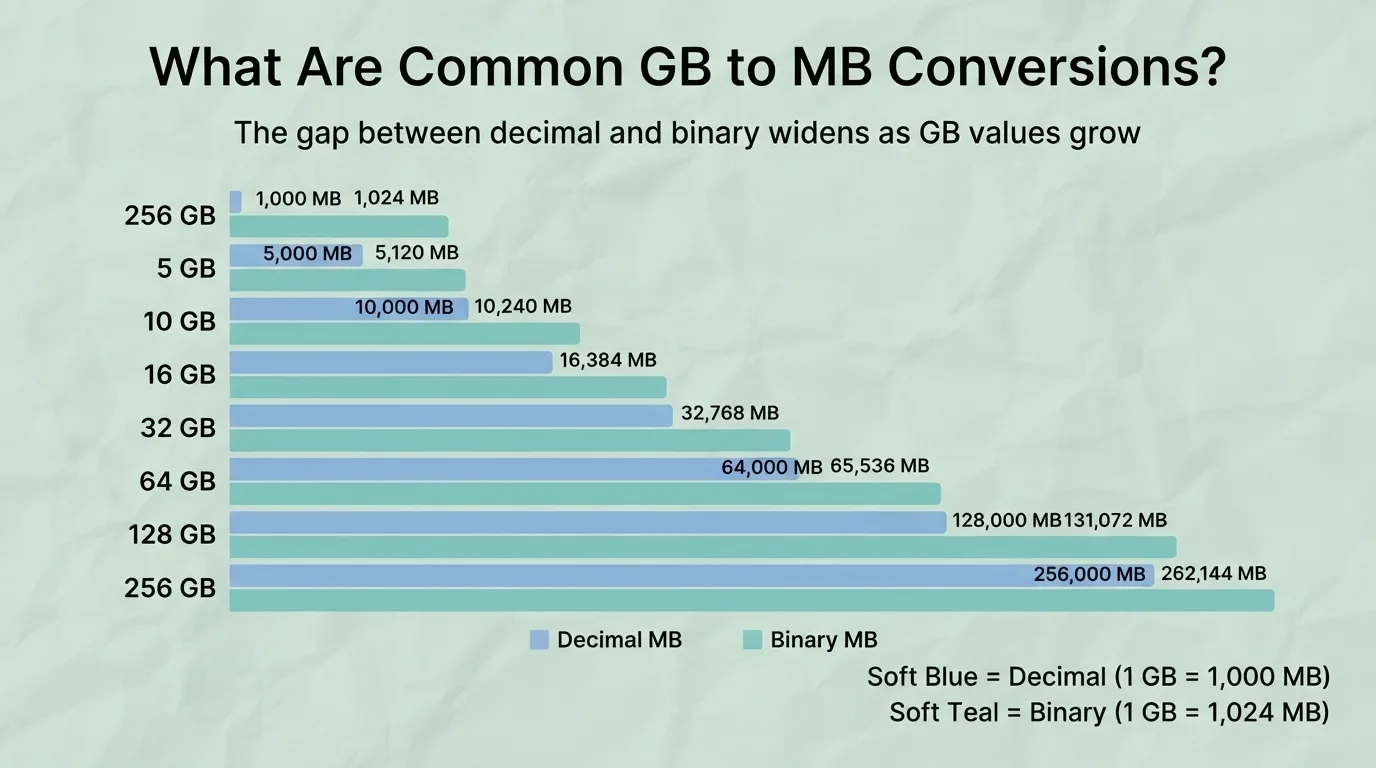
The table below lists frequently searched GB values with both the decimal and binary megabyte equivalent, covering values commonly seen in phone storage tiers, laptop drives, and data plans.
GB Value | Decimal MB (×1,000) | Binary MB (×1,024) |
1 GB | 1,000 MB | 1,024 MB |
2 GB | 2,000 MB | 2,048 MB |
5 GB | 5,000 MB | 5,120 MB |
8 GB | 8,000 MB | 8,192 MB |
10 GB | 10,000 MB | 10,240 MB |
16 GB | 16,000 MB | 16,384 MB |
25 GB | 25,000 MB | 25,600 MB |
32 GB | 32,000 MB | 32,768 MB |
50 GB | 50,000 MB | 51,200 MB |
64 GB | 64,000 MB | 65,536 MB |
100 GB | 100,000 MB | 102,400 MB |
128 GB | 128,000 MB | 131,072 MB |
256 GB | 256,000 MB | 262,144 MB |
A single-layer DVD holds 4.7 GB, equal to 4,700 MB decimal, and a single-layer Blu-ray disc holds 25 GB, equal to 25,000 MB decimal. A standard smartphone storage tier of 128 GB equals 131,072 MB binary, which is the figure closer to what a phone's settings menu displays after the operating system and pre-installed software occupy part of the drive.
What Is the Difference Between a Gigabyte and a Megabyte?
A gigabyte is the larger unit, and a megabyte equals one thousandth of a gigabyte under the decimal standard or one 1,024th under the binary standard. A gigabyte is always 1,000 or 1,024 times bigger than a megabyte, depending on the standard applied, and this ratio stays constant regardless of how large or small the gigabyte value is. The 2 units sit next to each other in the same base-1,000 or base-1,024 chain that also includes kilobytes below and terabytes above.
What Is a Gigabyte and What Is It Used For?
A gigabyte equals 1,000,000,000 bytes under the decimal standard, or 1,073,741,824 bytes under the binary standard. It measures the storage capacity of 4 common devices, these are USB flash drives, SSDs, hard drives, and RAM modules, and it also measures the size of movies and other large files such as installed video games and full-length HD videos. A typical smartphone today ships with a storage capacity between 64 GB and 512 GB, and a typical laptop RAM module ships with a capacity between 8 GB and 32 GB.
What Is a Megabyte and What Is It Used For?
A megabyte equals 1,000,000 bytes under the decimal standard, or 1,048,576 bytes under the binary standard. It measures individual file sizes such as documents, photos, and short audio clips, and it historically measured floppy disk capacity, with the common 3.5-inch floppy disk holding 1.44 MB. A typical smartphone photo today measures between 2 MB and 5 MB, and a typical 3-minute MP3 audio file measures between 3 MB and 5 MB.
What Are GiB and MiB, and How Do They Differ From GB and MB?

Gibibyte (GiB) and mebibyte (MiB) are units created specifically to mean the binary values without ambiguity. 1 GiB always equals exactly 1,024 MiB and 1,073,741,824 bytes, with no decimal alternative meaning, unlike GB and MB which shift meaning depending on context. The table below compares all 4 unit forms.
Unit | Byte Value |
1 GB (decimal) | 1,000,000,000 bytes |
1 GiB (binary) | 1,073,741,824 bytes |
1 MB (decimal) | 1,000,000 bytes |
1 MiB (binary) | 1,048,576 bytes |
GiB and MiB appear mostly in technical specifications and some operating systems, such as certain Linux distributions that label file sizes in MiB and GiB by default, while GB and MB remain the everyday terms in marketing and casual use, even when they sometimes carry the binary meaning. Despite being the technically correct terms, GiB and MiB are still rarely used or recognized outside software development and IT circles, so most readers will keep seeing GB and MB in both senses for the foreseeable future.
Why Does My Device Show Less Storage Than Advertised?

A device shows less storage than advertised because the manufacturer calculates capacity using the decimal standard, while the operating system displays capacity using the binary standard. A drive advertised as 256 GB using the decimal standard shows approximately 238 GB when an operating system measures it using the binary standard, and a drive advertised as 500 GB shows approximately 465 GB for the same reason. This gap is not missing or faulty storage, it is a difference in measurement standard applied to the same physical device, and the gap grows larger in absolute terms as the advertised capacity increases, even though the percentage difference of approximately 7% stays roughly constant.
How Do You Convert MB Back to GB?
To convert MB back to GB, divide the megabyte value by 1,000 for a decimal result, or by 1,024 for a binary result. For example, 5,000 MB divided by 1,000 equals 5 GB decimal, and 5,120 MB divided by 1,024 equals 5 GB binary. A larger value follows the same pattern, for example 51,200 MB divided by 1,024 equals 50 GB binary, and 50,000 MB divided by 1,000 equals 50 GB decimal. The calculator on this page supports both conversion directions using the same input field, so switching from GB to MB or from MB to GB does not require a separate tool.
How Does GB to MB Conversion Apply to Everyday Digital Tasks Like Photos, Storage, and Internet Data?
The same GB and MB units apply to several everyday tasks. Estimating how many photos or songs fit on a device relies on this conversion, as does comparing internet speed to file size, resizing a disk partition, checking a file against an upload limit, comparing storage to older physical media such as CDs and DVDs, working with neighboring units such as KB and TB, and planning cloud storage needs. Each of these situations applies the same GB to MB math already explained above, just in a different practical setting, and each one is covered in more detail below.
How Many Photos, Songs, or Videos Fit in a Gigabyte?
A high quality photo takes up roughly 2 to 5 MB, and a minute of MP3 audio takes up roughly 1 MB, while a minute of HD video typically takes up between 40 MB and 100 MB depending on the resolution and compression setting used. A 1 GB decimal value of 1,000 MB holds approximately 200 to 500 photos, or approximately 1,000 minutes of audio, or approximately 10 to 25 minutes of HD video, though exact file sizes vary by format and quality. File Size and Storage Capacity Estimator provides a detailed breakdown for planning storage on a phone, camera, or music library.
What Is the Difference Between Mbps (Speed) and MB (Storage)?
Megabits per second (Mbps) measures internet speed, while megabytes (MB) measures storage size, and 8 megabits equal 1 megabyte, since a byte is always 8 bits regardless of context. A 100 Mbps internet connection downloads at approximately 12.5 MB per second, not 100 MB per second, which is a frequent source of confusion when estimating download times, and this same division by 8 applies at any connection speed, so a 500 Mbps connection downloads at approximately 62.5 MB per second. Mbps to MBps internet speed calculator provides the full conversion for accurate download time estimates.
How Do You Convert KB to MB?
A kilobyte sits directly below a megabyte in the same unit chain, equal to 1,000 bytes decimal or 1,024 bytes binary, and 1 MB equals 1,000 KB decimal or 1,024 KB binary. Kilobytes are more practical than megabytes for smaller files such as text documents or basic images, since a plain text file often measures only a few KB, and a small icon image often measures under 50 KB. For example, 500 KB divided by 1,000 equals 0.5 MB decimal, and 2,048 KB divided by 1,024 equals 2 MB binary. KB to MB Conversion provides the full calculator and reference table for this unit pair.
How Do You Convert GB to TB?
A terabyte sits directly above a gigabyte in the same unit chain, equal to 1,000 GB decimal or 1,024 GB binary. Modern storage devices, such as external hard drives and cloud backup plans, are now commonly sized in terabytes rather than gigabytes, since a typical external hard drive today ranges from 1 TB to 8 TB. For example, 500 GB divided by 1,000 equals 0.5 TB decimal, and 2,048 GB divided by 1,024 equals 2 TB binary. GB to TB Conversion provides the full calculator for this unit pair.
How Do You Convert Bytes and Bits to Larger Storage Units?
Every storage unit on this page is built from the byte, and a byte itself contains 8 bits, which is the smallest practical unit of digital storage used in file systems. The full chain runs from bit to byte to kilobyte to megabyte to gigabyte, with each step multiplying by 1,000 decimal or 1,024 binary, so a single gigabyte ultimately breaks down into 8,000,000,000 bits decimal or 8,589,934,592 bits binary. According to the International Bureau of Weights and Measures, this same multiplication pattern applies consistently across all metric-based digital storage prefixes, from kilobyte up through petabyte. Bits and Bytes Conversion covers this full chain in detail.
How Much Cloud Storage Do You Need for Photos, Backups, or Email?
Estimating cloud storage needs starts with the free tier limit offered by a provider, commonly stated in GB, with common free tiers ranging from 5 GB to 15 GB before a paid upgrade becomes necessary. A 15 GB free plan, using the earlier estimate of 200 to 500 photos per gigabyte, holds approximately 3,000 to 7,500 photos before additional storage becomes necessary, and a full phone backup, which typically includes photos, app data, and device settings, can use between 2 GB and 20 GB depending on how many photos and videos the phone holds. Cloud Storage Plans Comparison covers current tier sizes and pricing for major providers.
How Do You Convert GB to MB When Resizing a Disk Partition?
Disk partitioning tools, such as Windows Disk Management or Linux disk utilities, often display or require partition sizes in MB rather than GB. A 150 GB partition equals 153,600 MB under the binary standard, which most operating system partition tools use by default, and a smaller 50 GB partition equals 51,200 MB under the same standard. Entering the wrong standard can leave the partition slightly smaller or larger than intended, which can matter when a partition is sized to match an exact operating system requirement or a dual-boot installation guide. Disk Partition Size Calculator provides the exact MB figure for any target partition size.
How Do You Convert GB to MB for File Upload Limits on Forms and Websites?
Government portals, job application sites, university admission forms, and cloud upload tools frequently state a maximum file size in MB. A 1.2 GB video file equals approximately 1,200 MB under the decimal standard, which exceeds a 500 MB upload limit and requires compression before upload, while a smaller 0.3 GB document equals approximately 300 MB and fits comfortably under the same limit. File Size Checker confirms whether a specific file fits under a stated limit before submission.
How Does a Gigabyte Compare to a CD, DVD, or Older Storage Media?

A CD holds about 700 MB, a single-layer DVD holds 4.7 GB (4,700 MB), a dual-layer DVD holds 8.5 GB, and a single-layer Blu-ray disc holds 25 GB, with a dual-layer Blu-ray disc holding 50 GB. Older formats, such as the 1.44 MB floppy disk, show how far storage capacity has grown over time, since more than 17,000 floppy disks would be required to match a single 25 GB Blu-ray disc. Media Capacity Comparison places all of these formats side by side for a full historical view.