

Algebra can feel like a wall of letters and numbers until you know which rule applies where. An algebra calculator takes any equation, expression, or polynomial you type in and works through it the same way you would by hand, one step at a time. Instead of only handing you an answer, it shows how it got there, which is the part that actually helps you learn. Whether you are checking a homework problem, prepping for a test, or trying to remember how to isolate a variable, this page covers what the calculator does, what it can solve, and how to get the most out of it.
What Is an Algebra Calculator and How Does It Work?
An algebra calculator is a tool, either an app, a website, or a physical graphing calculator, built to solve algebraic equations and expressions rather than just crunch plain numbers. The moment you type in something like 3x + 2 = 14, it reads the expression, works out which method applies (isolating the variable, factoring, or simplifying), then runs through that method one operation at a time. This is different from an ordinary calculator, which only works with numbers you already know. An algebra calculator is built to handle the unknown, the x, y, or z sitting inside your equation, and solve for it using the same logic your teacher would use on the whiteboard.
What Steps Does the Calculator Follow to Solve an Equation?
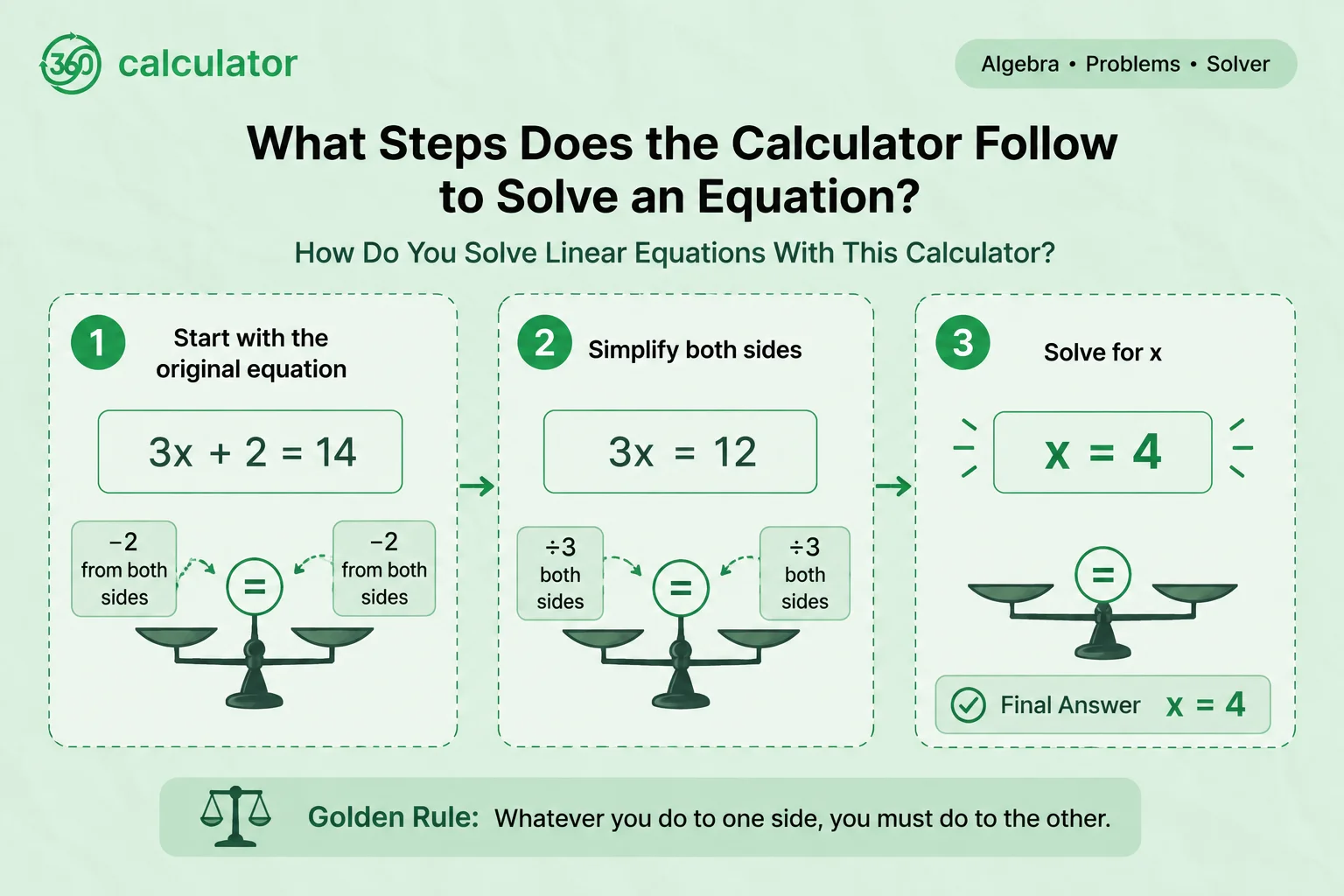
Take the equation 3x + 2 = 14 as an example. The calculator first subtracts 2 from both sides, leaving 3x = 12. It then divides both sides by 3, landing on x = 4. Each move gets shown on its own line instead of jumping straight to the result. That matters because algebra is really a chain of small, logical decisions, and seeing every link in that chain is what lets you follow the reasoning instead of just accepting a number on a screen.
Step | What Happens |
1 | Start with 3x + 2 = 14 |
2 | Subtract 2 from both sides: 3x = 12 |
3 | Divide both sides by 3: x = 4 |
What Types of Algebra Problems Can This Calculator Solve?
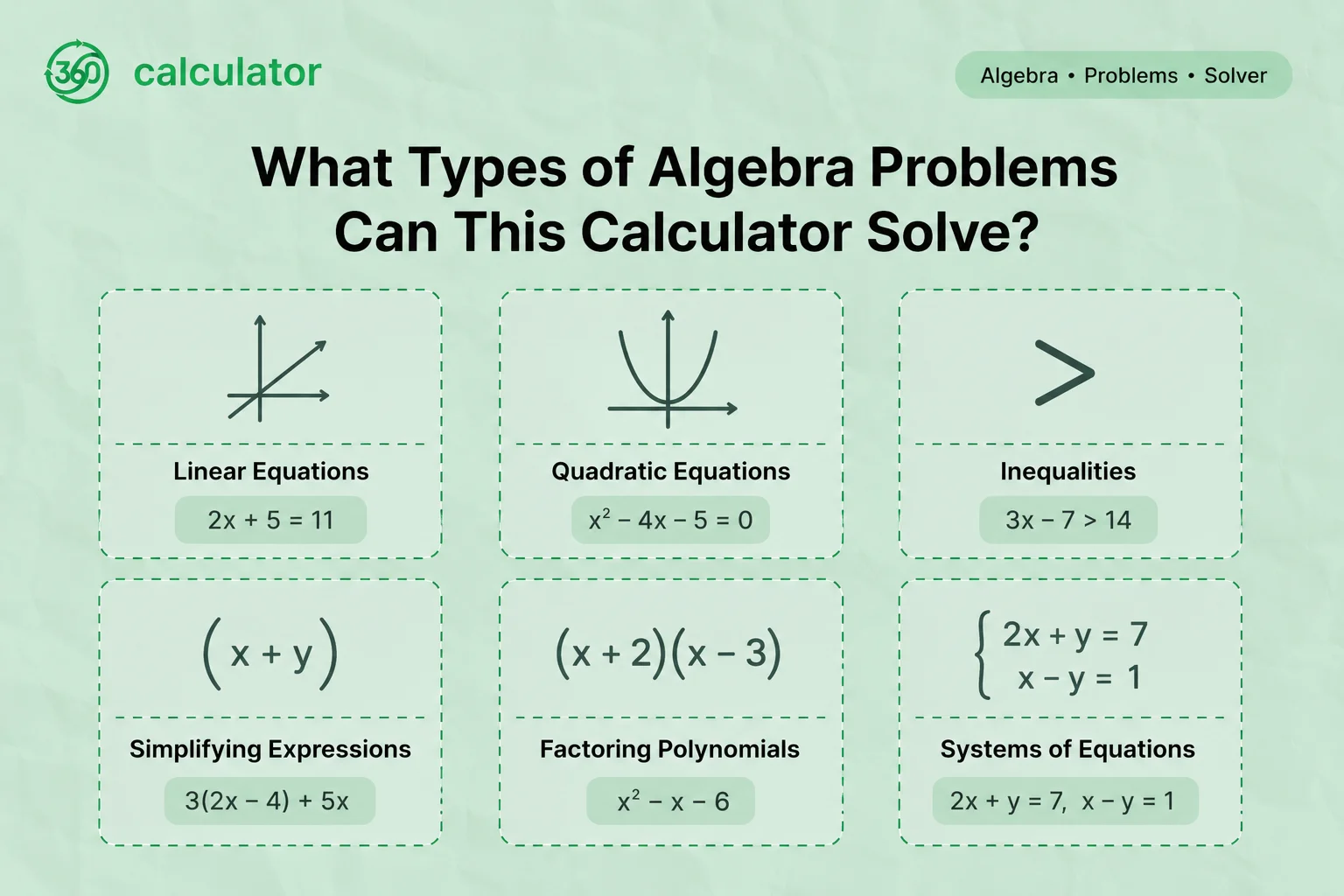
Most algebra homework falls into a handful of categories, and this calculator is built to handle all of them. The table below gives a quick breakdown, along with a simple example of each so you can spot which one matches your own problem.
Category | Example Problem |
Linear equations | 2x + 5 = 11 |
Quadratic equations | x² - 5x + 6 = 0 |
Inequalities | 2x - 5 < 9 |
Simplifying expressions | 4x + 5 - 2x + 3 |
Factoring polynomials | x² - 9 |
Systems of equations | x + y = 10, x - y = 2 |
How Do You Solve Linear Equations With This Calculator?
A linear equation is one where the variable only appears to the first power, no squares, no roots, just a plain x. Take 2x + 5 = 11. The calculator subtracts 5 from both sides to get 2x = 6, then divides by 2 to land on x = 3. You get the final value and the full working together, so you can check exactly where your own attempt lined up or went off track.
How Do You Solve Quadratic Equations With This Calculator?
A quadratic equation includes a squared variable term, something like x² - 5x + 6 = 0. The calculator usually tries factoring first since it is often the fastest route, and falls back on the formula method when the equation will not factor cleanly. For this example it factors the expression into (x - 2)(x - 3) = 0, then solves each bracket separately to get x = 2 and x = 3. A closer look at the formula method itself is covered on the quadratic formula calculator.
How Do You Simplify Algebraic Expressions With This Calculator?
Simplifying means combining like terms until an expression is as short as it can get. Given 4x + 5 - 2x + 3, the calculator groups the x terms (4x - 2x = 2x) and the constants (5 + 3 = 8), landing on 2x + 8. No variable gets solved here since there is no equals sign to work with, only terms getting combined.
How Do You Factor Polynomials With This Calculator?
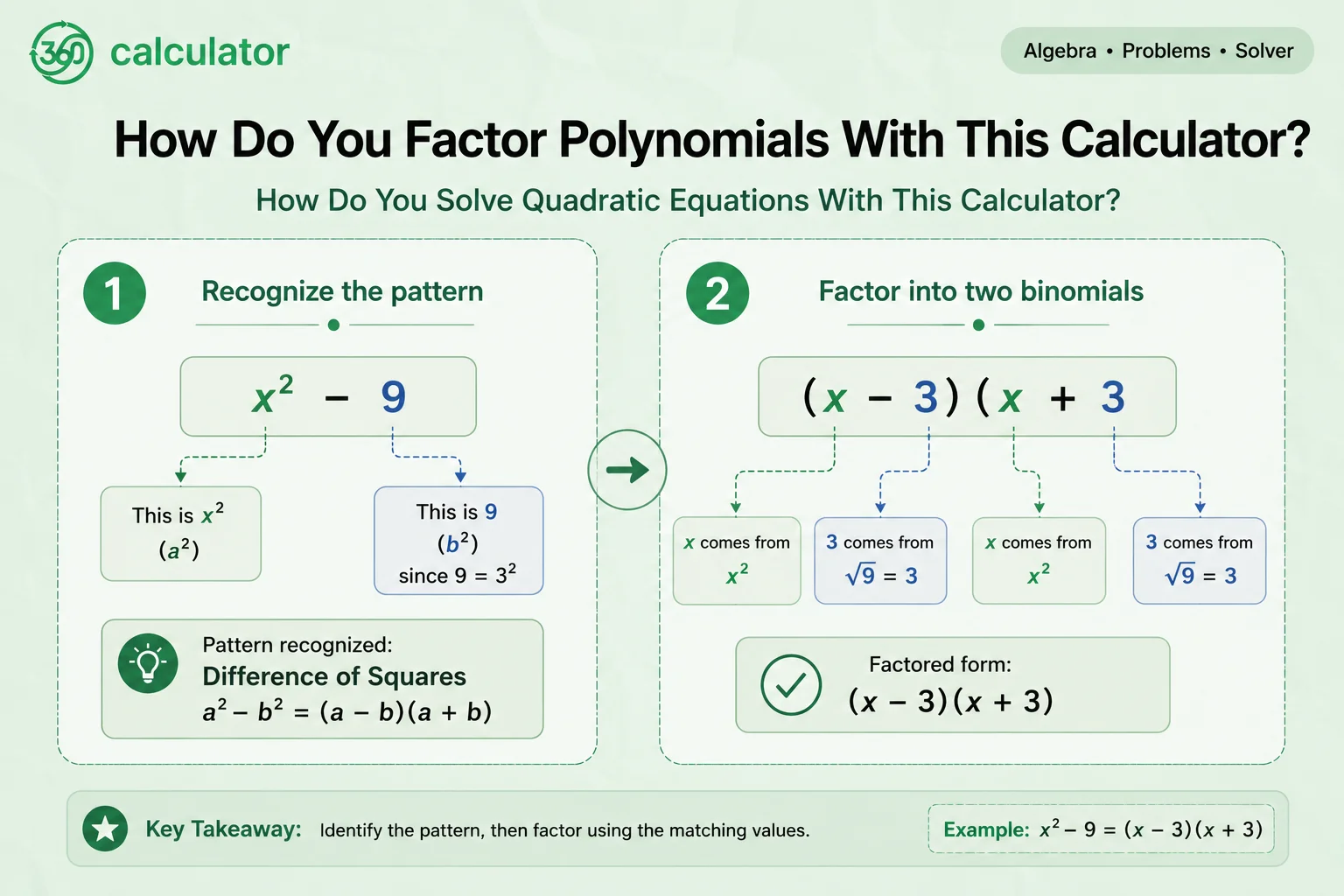
Factoring rewrites a polynomial as a product of simpler pieces. For x² - 9, the calculator recognizes it as a difference of squares and factors it into (x - 3)(x + 3). For messier polynomials it may pull out a common factor first before applying a specific pattern. A polynomial that needs a second method, such as grouping, gets a fuller walkthrough on the factoring calculator.
How Do You Solve Inequalities With This Calculator?
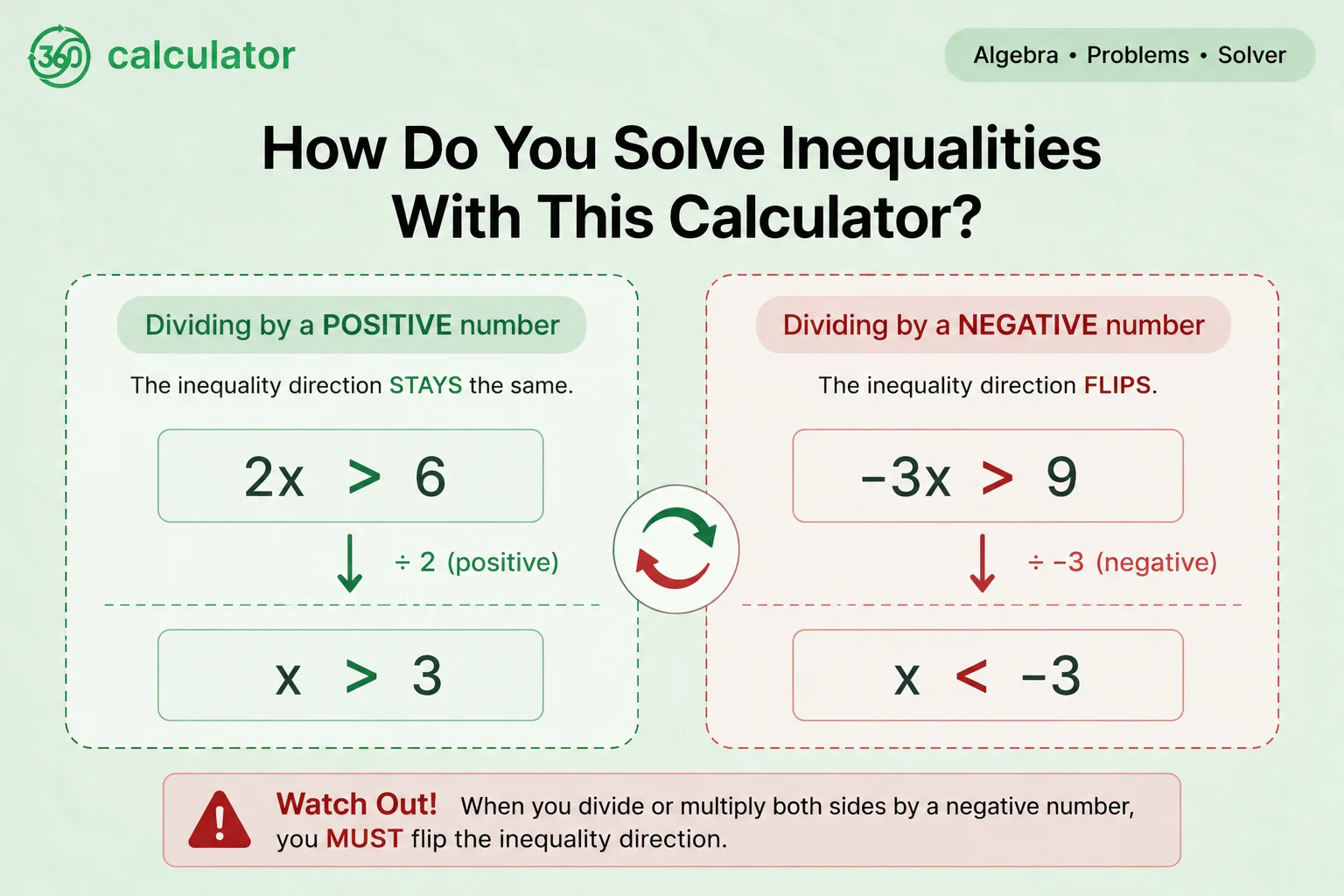
An inequality compares two expressions using greater than, less than, or their “or equal to” versions, instead of an equals sign. Solving one works almost exactly like solving an equation, with one rule that trips people up constantly: if you multiply or divide both sides by a negative number, the inequality sign flips. Take -3x > 9. Dividing both sides by -3 gives x < -3, notice the sign flipped from > to <. Miss that flip and the answer is wrong even though every other step was correct. A closer look at how solutions get plotted on a number line is covered on the inequality calculator.
How Do You Enter a Problem Into the Algebra Calculator?
Getting the calculator to read your problem correctly comes down to using the right symbols. Type your equation or expression into the input box using standard keyboard characters, a plus sign for addition, a minus sign for subtraction, and so on. Most tools also let you snap a photo of a handwritten problem if typing it out feels slower. Once it is entered, hit calculate and the step-by-step breakdown appears below it.
What Symbols Does the Calculator Accept for Operations?
Symbol | Meaning |
+ | Addition |
- | Subtraction |
* | Multiplication |
/ | Division |
^ | Exponent (raised to the power) |
sqrt() | Square root |
Stick to these and the calculator reads your problem exactly the way you intended. Typing sqrt(9), for example, tells it you want the square root of 9, not 9 multiplied by something else.
Why Do the Step-by-Step Solutions Matter More Than the Final Answer?
An answer on its own tells you almost nothing about where you went wrong. Step-by-step working does. If your own attempt lands on a different number, comparing your steps against the calculator's lets you find the exact line where things diverged, instead of only knowing the whole attempt was off somewhere. This is really the entire reason students reach for these tools before a test rather than only when an assignment is due, it is a way to practice the reasoning, not just collect answers.
What Common Mistakes Do Students Make When Solving Algebra Problems?
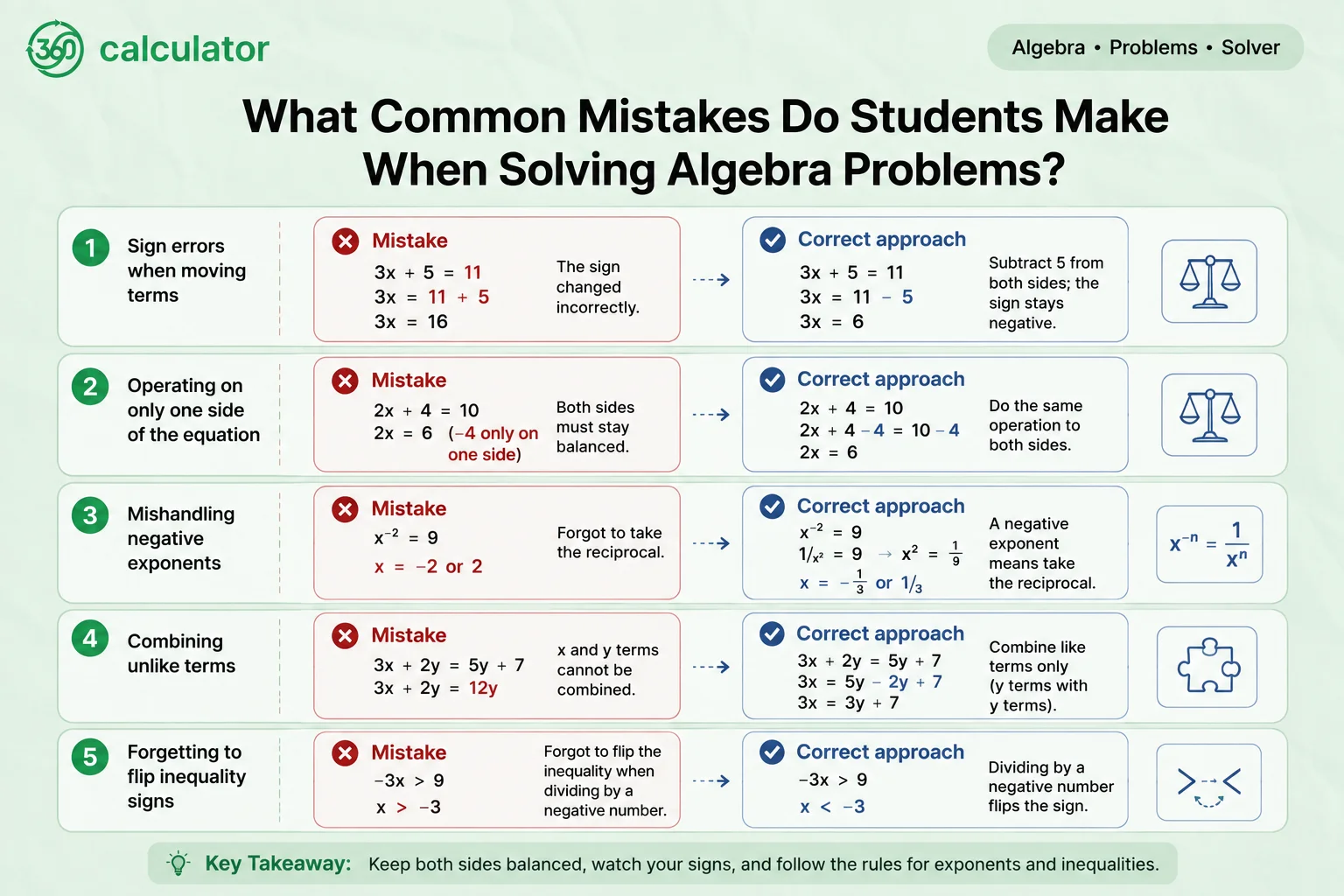
A few errors show up again and again in algebra homework, and most of them are not about understanding the concept, they are about a rule getting skipped somewhere in the middle of a longer problem.
Mistake | What Actually Happens |
Sign errors when moving terms | Forgetting a term changes sign when it is moved across the equals sign |
Operating on only one side | Applying a step to one side of the equation but not the other |
Mishandling negative exponents | Treating a negative exponent as a negative number instead of a reciprocal |
Combining unlike terms | Adding terms with different variables or powers as if they matched |
Forgetting to flip inequality signs | Not reversing > or < when multiplying or dividing by a negative number |
Running your own working through the calculator is often the fastest way to spot which one of these you are prone to.
Is the Algebra Calculator Accurate and Can You Trust the Results?
For the vast majority of standard problems, yes. The calculator applies the same verifiable rules you would use by hand, and you can always check a result yourself by substituting the answer back into the original equation. That said, no automated tool is completely free of edge cases, particularly with unusual notation or multi-step word problems, so it is worth double-checking anything that looks off rather than assuming the calculator is always right.
Is the Algebra Calculator Free to Use on Any Device?
Yes, the core calculator is free and works on both desktop and mobile without requiring an account. Some platforms also offer a companion app that works even without an internet connection, useful if you are studying somewhere without reliable service. Advanced features, like unlimited photo scans or extended practice sets, are sometimes reserved for a paid tier, but solving a standard equation with full steps typically costs nothing.
How Does This Algebra Calculator Connect to Other Areas of Math?
Algebra rarely stays contained to one page of homework. The same skills used to isolate a variable here feed directly into graphing, into more advanced equation types, and into the specialized tools built around each one. Once the basics above feel comfortable, the sections below go a level deeper into specific problem types and the dedicated calculators built for each.
How Do You Solve Quadratic Equations Using the Quadratic Formula?
When a quadratic will not factor cleanly, the quadratic formula is the fallback that always works. For ax² + bx + c = 0, the formula is x = (-b ± √(b² - 4ac)) / 2a. Plug in the coefficients from your equation, work through the square root, and you get both possible values of x. The quadratic formula calculator walks through this plug and solve process on any equation you enter, which is useful once factoring stops being the quickest option.
How Do You Factor a Polynomial Step by Step?
Beyond pulling out a common factor, one useful technique is factoring by grouping, splitting a four-term polynomial into two pairs, factoring each pair separately, then pulling out the shared binomial. It takes a bit more practice to spot than basic factoring. The factoring calculator breaks down which method applies to a given polynomial and shows the grouping in full.
How Do You Simplify a Complex Algebraic Expression?
Basic simplifying gets harder once nested parentheses or multiple variables enter the picture, since you have to work from the innermost parentheses outward before combining anything. An expression like 2(3x + 4(y - 2)) needs the inner parentheses resolved first, then the outer one, before any like terms can be combined. The simplify calculator is built specifically for expressions at this level, where the order of operations matters as much as the combining itself.
How Do You Solve and Graph an Inequality?
Once an inequality is solved, the solution is usually shown as a range on a number line rather than a single point. An open circle marks a strict inequality, just > or <, while a filled circle marks one that includes equal to. The inequality calculator covers both the solving and the number line notation in more detail, including compound inequalities that combine two conditions at once.
How Do You Solve a System of Linear Equations?
A system of equations is two or more equations that share the same variables, and solving one means finding the values that satisfy all of them at once. The two most common approaches are substitution, solving one equation for a variable and plugging it into the other, and elimination, adding or subtracting the equations to cancel a variable out entirely. The system of equations calculator walks through both methods on whatever pair of equations you are working with.
How Do You Add and Simplify Algebraic Fractions?
Adding algebraic fractions works the same way as adding numeric ones, a common denominator is needed before anything else can happen. Once the denominators match, the numerators combine and the result gets simplified further if it can be reduced. The fraction calculator handles this process for fractions with variables in the numerator, denominator, or both.
How Do You Graph an Algebraic Equation?
A solved or simplified equation can usually be plotted by picking a few values for x, solving for the matching y at each one, and plotting those points. A linear equation gives a straight line this way, a quadratic gives a parabola. The graphing calculator takes any equation and plots it directly, a faster way to see the shape of a solution than plotting points by hand.
How Does a Scientific Calculator Handle Algebra Functions?
A scientific calculator is built for individual computations, things like trigonometric functions, logarithms, or exponents on numbers you already know. It is not designed to solve a full equation for an unknown variable the way this tool is. If your work leans more toward single calculations than full equation solving, the scientific calculator is the better fit, and the two tools often get used side by side during the same homework session.
Where Can You Practice More Algebra Problems After Using the Calculator?
Checking one problem is useful, but real comfort with algebra comes from working through a range of problems on your own. The algebra practice problems page has a broader set of exercises across every topic covered here, and you can always run your own answer back through the calculator to confirm you got it right.
Frequently Asked Questions
What Types of Algebra Problems Can This Calculator Solve?
It handles linear equations, quadratic equations, inequalities, simplifying expressions, factoring, and fractions, from basic homework problems up to more advanced levels.
Does the Algebra Calculator Show Step-by-Step Solutions?
Yes. Every problem comes with the full working, not just the final answer, so you can see exactly how the result was reached.
What Is the Golden Rule of Algebra?
Whatever operation is performed on one side of an equation has to be performed on the other side too, so the equation stays balanced.
Can the Algebra Calculator Solve Word Problems?
It solves typed equations and expressions, so a word problem needs to be turned into an equation first. Once it is written out, for example turning ticket sales into a + c = 250, that equation can be typed straight in.
What Symbols Do I Use to Enter My Equation?
Use + for addition, - for subtraction, * for multiplication, / for division, ^ for exponents, and sqrt() for square roots.